
installing rtcs for raspberry pi mouse (raspbian)
✏️ Edit this page on GitHub#contents
RaspberryPiMouseRTC
RaspberryPiMouseRTC is an RT-Component for controlling Raspberry Pi Mouse, developed by the Robot System Design Laboratory at Meijo University.
It can be installed using the following commands:
 git clone https://github.com/rsdlab/RaspberryPiMouseRTC.git
 cd RaspberryPiMouseRTC
 cmake .
 make
Install the following RTCs as needed.
RaspberryPiMouseController_DistanceSensor
This RTC generates obstacle-avoidance behavior by rotating the Raspberry Pi Mouse when its distance sensors detect an obstacle.
It can be installed using the following commands:
 git clone https://github.com/Nobu19800/RaspberryPiMouseController_DistanceSensor
 cd RaspberryPiMouseController_DistanceSensor
 cmake .
 make

| RaspberryPiMouseController_DistanceSensor | ||
|---|---|---|
| InPort | ||
| Name | Data Type | Description |
| target_velocity_in | RTC::TimedVelocity2D | Target velocity before correction |
| distance_sensor | RTC::TimedShortSeq | Distance sensor measurements |
| OutPort | ||
| Name | Data Type | Description |
| target_velocity_out | RTC::TimedVelocity2D | Target velocity after correction |
| Configuration Parameters | ||
| Name | Default Value | Description |
| sensor_limit | 10 | Distance sensor threshold that triggers avoidance behavior |
| rotational_speed | 1.6 | Speed of avoidance rotation |
| stop_velocity | 0.01 | Forward velocity threshold used to determine whether the robot is stopped |
RaspberryPiMouseController_Joystick
This RTC controls the Raspberry Pi Mouse in a specified direction using a joystick.
This RTC requires an orientation-sensing RTC such as NineAxisSensor_RT_USB described below.
It can be installed using the following commands:
 git clone https://github.com/Nobu19800/RaspberryPiMouseController_Joystick
 cd RaspberryPiMouseController_Joystick
 cmake .
 make
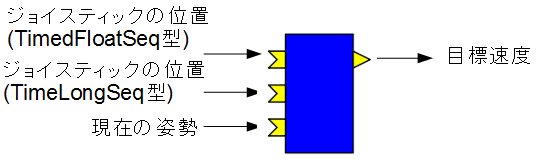
| RaspberryPiMouseController_Joystick | ||
|---|---|---|
| InPort | ||
| Name | Data Type | Description |
| joystick_float | RTC::TimedFloatSeq | Joystick input |
| joystick_long | RTC::TimedFloatSeq | Joystick input |
| orientation | RTC::TimedOrientation3D | Orientation measured by sensors |
| OutPort | ||
| Name | Data Type | Description |
| out | RTC::TimedVelocity2D | Target velocity |
| Configuration Parameters | ||
| Name | Default Value | Description |
| forward_factor | 0.01 | Forward velocity scaling factor applied to joystick input |
| tangential_factor | 1.0 | Rotational velocity scaling factor applied to joystick input |
| x_reverse | 0 | Reverse the joystick X coordinate when set to 1 |
| m_y_reverse | 0 | Reverse the joystick Y coordinate when set to 1 |
NineAxisSensor_RT_USB
This RTC outputs measurement data from the USB 9-Axis IMU Sensor Module sold by RT Corporation.
It can be installed using the following commands:
 git clone https://github.com/Nobu19800/NineAxisSensor_RT_USB
 cd NineAxisSensor_RT_USB
 cmake .
 make
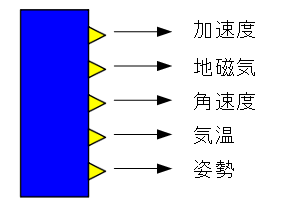
| NineAxisSensor_RT_USB | ||
|---|---|---|
| OutPort | ||
| Name | Data Type | Description |
| acc | RTC::TimedAcceleration3D | Accelerometer measurements |
| magn | RTC::TimedDoubleSeq | Geomagnetic sensor measurements |
| gyro | RTC::TimedAngularVelocity3D | Gyroscope measurements |
| temp | RTC::TimedDouble | Temperature sensor measurements |
| rot | RTC::TimedOrientation3D | Orientation |
| Configuration Parameters | ||
| Name | Default Value | Description |
| rotOffset | 0 | Orientation offset (adjust when 0 [rad] should represent a direction other than north) |
| magnOffsetX | -65 | Geomagnetic sensor offset (X-axis) |
| magnOffsetY | -60 | Geomagnetic sensor offset (Y-axis) |
| magnOffsetZ | -5 | Geomagnetic sensor offset (Z-axis) |
| serial_port | COM3 (Windows), /dev/ttyACM0 (Linux) | Device file name |
Calibration software for the geomagnetic sensor can be installed using the following commands:
 git clone https://github.com/Nobu19800/CalibrationUSBNineAxisSensor
 cd CalibrationUSBNineAxisSensor
 cmake .
 make
When executed, the software starts a 10-second countdown.
During this time, rotate the sensor through various orientations.
If possible, perform a figure-eight motion similar to the compass calibration procedure used on smartphones.
At the end of the process, calibration values for the X, Y, and Z geomagnetic sensor axes will be displayed.
Multiply each value by -1 and apply the results to the corresponding configuration parameters of NineAxisSensor_RT_USB.
If the sensor is later mounted on a robot or its installation conditions change, perform calibration again.
Batch Installation
The RTCs listed above can be installed all at once.
Run the following commands:
 git clone https://github.com/Nobu19800/RaspberryPiMouseRTSystem_script_Raspbian
 cd RaspberryPiMouseRTSystem_script_Raspbian
 sh Component/install_rtc.sh
This installs each RTC into the Component directory of RaspberryPiMouseRTSystem_script_Raspbian.
The calibration software is not installed automatically and must be installed manually.