
operation check
✏️ Edit this page on GitHub#contents
After logging in to the Raspberry Pi, verify operation by accessing the device files from the command line.
For the location and details of each device, refer to the Raspberry Pi Mouse Manual:
- http://resources.rt-net.jp/products/RPiM/raspberryPiMouseManual_2015_08_04.pdf
LEDs
Use the following commands to verify that each LED turns on and off correctly.
echo 1 > /dev/rtled0
echo 0 > /dev/rtled0
echo 1 > /dev/rtled1
echo 0 > /dev/rtled1
echo 1 > /dev/rtled2
echo 0 > /dev/rtled2
echo 1 > /dev/rtled3
echo 0 > /dev/rtled3
Switches
Press and release each switch while running the following commands.
cat /dev/rtswitch0
cat /dev/rtswitch1
cat /dev/rtswitch2
cat /dev/rtswitch3
Buzzer
Use the following commands to verify that the buzzer sounds correctly.
echo 440 > /dev/rtbuzzer0
echo 0 > /dev/rtbuzzer0
Distance Sensors
Place an object near the distance sensor and then move it away while running the following command.
cat /dev/rtlightsensor0
Motors
First, turn the motor power switch ON.
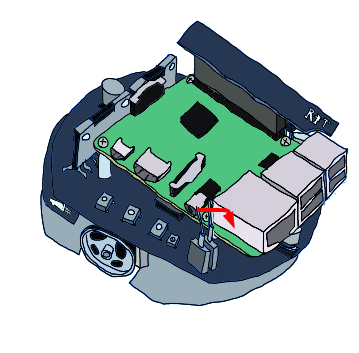
Use the following commands to verify that the wheels rotate correctly.
echo 1 > /dev/rtmotoren0

echo 400 > /dev/rtmotor_raw_l0
echo -400 > /dev/rtmotor_raw_l0
echo 0 > /dev/rtmotor_raw_l0

echo 400 > /dev/rtmotor_raw_r0
echo -400 > /dev/rtmotor_raw_r0
echo 0 > /dev/rtmotor_raw_r0

echo 0 > /dev/rtmotoren0
When finished, turn the motor power switch OFF.