
service port configuration procedure
✏️ Edit this page on GitHub#contents
Creating an IDL File
Create the IDL file to use. Use MyService.idl, which is included with the OpenRTM-aist sample components. If you copy and use the following code, remove the spaces at the beginning of each line.
 module SimpleService {
 typedef sequence<string> EchoList;
 typedef sequence<float> ValueList;
 interface MyService
 {
   string echo(in string msg);
   EchoList get_echo_history();
   void set_value(in float value);
   float get_value();
   ValueList get_value_history();
 };
 };
Creating RTCs
Creating the RTC on the Required Side
Create an RTC whose module name is MyServiceConsumer with RTC Builder. Enable onExecute as an activity.
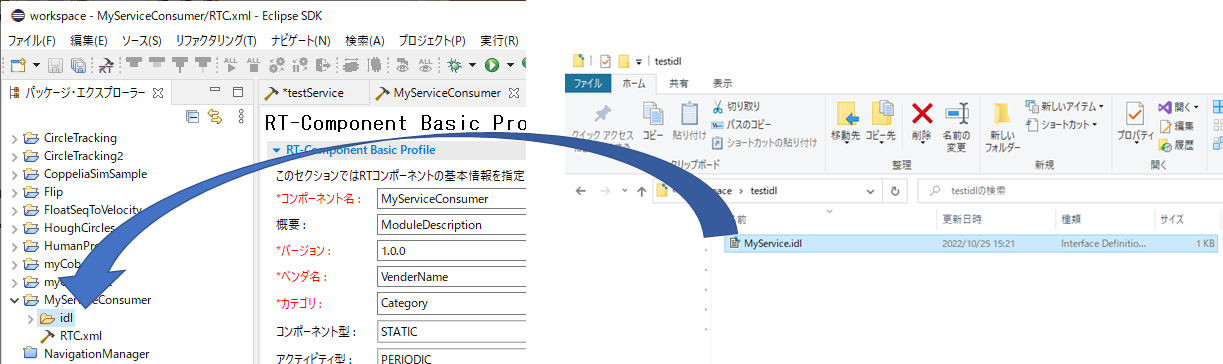
Next, from the RTC Builder Package Explorer, drag and drop the created IDL file (MyService.idl) into the idl folder of MyServiceConsumer to copy the file.
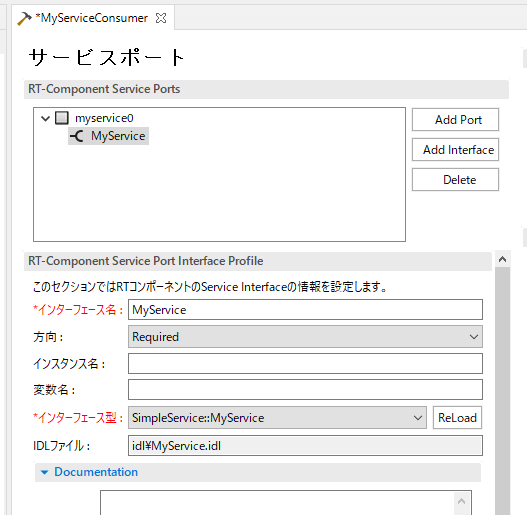
In the service port settings, press the Add Port button to add a service port, and press the Add Interface button to add a service interface.
This time, set the port name to myservice0, the interface name to MyService, the direction to Required, and the interface type to SimpleService::MyService.
The RTC specification is summarized as follows.
| Component Name | MyServiceConsumer |
|---|---|
| Language | C++ |
| Activity | onInitialize, onExecute |
| > | CENTER: Service |
| Port Name | myservice0 |
| > | CENTER: Interface |
| Interface Name | MyService |
| Direction | Required |
| Interface Type | SimpleService::MyService |
Generate code with RTC Builder, and edit the onExecute function as follows.
 RTC::ReturnCode_t MyServiceConsumer::onExecute(RTC::UniqueId /*ec_id*/)
 {
    try
    {
      std::cout << m_MyService._ptr()->echo("test") << std::endl;
    }
    catch (...)
    {
    }
   return RTC::RTC_OK;
 }
This calls the echo function of the MyService interface defined in the IDL file. When the service port is connected, the echo function implemented on the Provided side is called. If the RTC on the Provided side is not in the active state, the echo function throws an exception, so exception handling is performed with try-catch. If exception handling is not performed, the RTC may transition to the Error state.
After that, build it and generate the executable file.
Creating the RTC on the Provided Side
Create an RTC with the following specification in RTC Builder. Set the interface direction to Provided.
| Component Name | MyServiceProvider |
|---|---|
| Language | C++ |
| Activity | onInitialize |
| > | CENTER: Service |
| Port Name | myservice0 |
| > | CENTER: Interface |
| Interface Name | MyService |
| Direction | Provided |
| Interface Type | SimpleService::MyService |
After generating the code, edit the SimpleService_MyServiceSVC_impl::echo function in MyServiceSVC_impl.cpp.
 #include <iostream>
 /*
- Methods corresponding to IDL attributes and operations / ``` char SimpleService_MyServiceSVC_impl::echo(const char* msg) { std::cout « msg « std::endl;
return CORBA::string_dup(msg); } ```
The echo function was called in the onExecute function of MyServiceConsumer, but when the service ports are connected, the SimpleService_MyServiceSVC_impl::echo function is called. If the return type is a string (char*), memory must be copied from msg using the CORBA::string_dup function.
After editing is complete, build it.
Operation Check
Connect the ports in RT System Editor as shown below, and activate the RTCs.
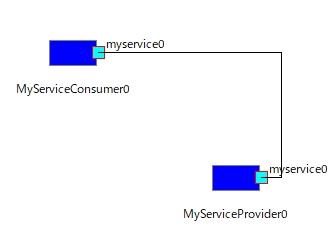
If “test” is displayed continuously in the window, it is operating normally. On the Required side, the echo function on the Provided side is called and a string is passed. On the Provided side, the received string is output to standard output and then returned to the Required side. Finally, the returned string is output to standard output on the Required side.
For how to use data other than strings, and how to use this in Python, Java, and Lua, refer to the following sample components.